| Copy |
|
| 3D
to Clipboard |
Copy
3D to clipboard, same as Ctrl+C |
| Paste
to Img1 |
Paste
image from clipboard to reference image 1, same as Ctrl+F1 |
| Paste
to Img2 |
Paste
image from clipboard to test image 2, same as Ctrl+F2 |
| Screen
to Img1 |
Paste
image from clipboard to reference image 1, same as Sift+F1 |
| Screen
to Img2 |
Paste
image from clipboard to reference image 2, same as Sift+F2 |
| - |
- |
| Images |
- |
| Reload |
Reload
both images from original files |
| Swap |
Swap
Reference and Test images |
| Rotate |
Rotate
images in 90 degree steps |
| Crop
Selection |
Cut
image to Range of Interest (ROI) size |
|
Crop
Both
|
Crop
both Reference and Test Images |
|
Crop
1
|
Crop
Reference Image |
|
Crop
2
|
Crop
Test Image |
| - |
- |
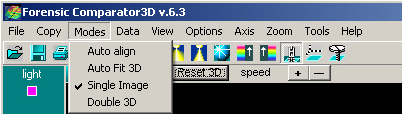
| Modes |
Mode
of Operation selector |
| Single |
Single
Image Mode: only reference image used |
| Double
3D |
Double
Mode: Both images Side by Side in 3D representation |
| Double
3D/2D |
Double
Mode: Both images, reference in 3D test in 2D representation |
| - |
- |
| Data |
Preprocessing
of images |
| Smooth
3D |
Smooth
data in both images |
| Filter
Z Values |
Filter
cutoff elevations, brings the form for max/min values setting |
| Flip
Z |
Invert
elevation data |
| Cut
Background |
Cut-off
the background with advanced nonlinear filter |
| Cut
Offset |
Cutoff
the offset of both images |
| Auto
Contrast |
Set
Z scale of the test image 2 to same values as reference image 1 |
| Reload |
Reload
data to original after several filters used |
| Undo |
Undo
last filter (only one step) |
| - |
- |
| View |
View
Options of the screen |
| Scrolls |
3D
window scrolls on/off |
| Color
scale |
Elevation
palette visible on/off |
| - |
- |
| Options |
Options
of 3D |
| Smooth
3D |
Smooth
data in both images |
| 3D
colors |
Elevation
based palette on/off |
| Contour |
Contour
on/off (reference image) |
| Data
Compress |
select
data compression options |
|
none
|
No
compression: slow but best quality mode, recommended for 512x512 point images |
|
x4
|
Medium
compression: faster normal quality mode, recommended for 1kx1k point images |
|
x16
|
Maximum
compression: fastest optimized quality mode, recommended for big images |
| Fast
render |
Fast
3D mode on/off, recommended for all images above 200x200 points |
| - |
- |
| Axis |
3D axis options |
| Visible |
3D
axis on/off |
| Axis
Options... |
Axis
options form |
| Grid |
Axis
grid on/off |
| Show
Captions |
Axis
captions on/off, captions content is set in Axis Options form |
|
Font
size
|
3D
Axis label size changeable in steps |
|
up
|
Label
Size UP |
|
down
|
Label
Size DOWN |
| - |
- |
| Zoom |
3D
Zoom images |
| Zoom
+ |
All
direction Zoom of both images UP |
| Zoom
- |
All
direction Zoom of both images Down |
| Zoom
Z+ |
Data
Zoom of both images UP |
| Zoom
Z- |
Data
Zoom of both images Down |
| Zoom
FlatZ |
Data
Zoom of both images Down to FLAT view on/off |
| - |
- |